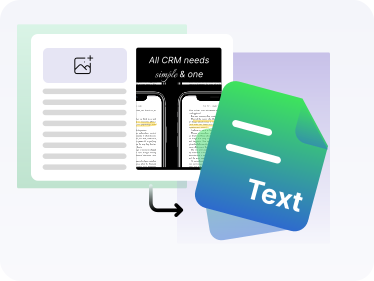
Our photo to text converter is an online tool that extract text from images with speed, and accuracy. Turn your images in editable document. (Fast & Free)
Drag, Upload or Paste images
Supported: JPG, PNG, JPEG, GIF, JFIF, PDF
up to 10 MB image size
* Data security comes first – We’ll never sell, store or share your data
We built this tool to remove one simple but constant frustration: retyping text that already exists inside images. Notes, screenshots, scanned pages, and documents slow work down if they’re locked in visual form. So, we created a faster way to move information forward.
Our tool works as an AI-powered image to text generator designed for everyday clarity and real workflows. Once you upload an image, the OCR technology analyzes layout, locates text regions, and reads characters with precision. After recognition, it applies structural refinement to organize spacing, lines, and alignment. So, ultimately, you get an editable text perfectly clean, readable, and ready for use.
Rest assured that our pic to text tool adapts to different image types and writing styles. Yes, printed text, screenshots, or handwritten notes all move through the same intelligent pipeline. Each step focuses on accuracy, speed, and usability, so the extracted text fits directly into documents, files, or ongoing work.
Our photo-to-text generator follows a clear OCR extraction pipeline, designed to keep every step predictable and reliable.
Start by uploading a photo, screenshot, scanned page, or document from your device. Drag and drop, direct file upload, or image URL options stay available.
After uploading, the system applies Optical Character Recognition (OCR) to analyze the image layout. It detects text regions, lines, words, and characters through pattern recognition and segmentation logic.
The image to text generator then applies AI models to interpret characters, symbols, and spacing. Just so you know, this phase of text extraction focuses on reading accuracy across printed text, screenshots, and handwritten content.
Once recognition is completed, the extraction engine organizes the content into a readable structure. Our JPEG to text converter ensures spacing, alignment, and line order follow the original layout. So, it can perfectly preserve meaning and usability.
Our tool will deliver the extracted text in editable form, ready for copying, editing, or saving. Photo to text results support notes, documents, and active workflows without manual retyping.
You can copy the extracted text directly into documents or download it for later use. The process supports fast reuse across files, notes, and work systems.
Our tool uses Optical Character Recognition powered by AI models to analyze image layouts, detect text regions, and read characters with precision.
The extraction pipeline focuses on character clarity, spacing, and structure. It supports reliable photo to text processing for all docs, including screenshots, scans.
The system processes image files using controlled segmentation and recognition logic, ensuring text extraction without layout confusion or content loss.
Our pic to text tool supports common image formats, including JPG, PNG, GIF, TIFF, WEBP, HEIC, and PDF, allowing flexible uploads without format restrictions.
AI models analyze strokes, curves, and character patterns to support handwritten content during image to text extraction.
The OCR pipeline organizes lines, paragraphs, and spacing during extraction, delivering text that stays readable and editable for documents and files.
The system processes uploads quickly while maintaining recognition accuracy, supporting smooth text extraction without delays.
Our photo to text converter delivers extracted text in editable form, ready for copying, editing, or saving into notes and documents, or workflows.
Images process inside a controlled environment. No storage, sharing, or retention takes place beyond the extraction session.
Our JPEG to text tool is 24/7 accessible without registration, subscriptions, or setup steps, so your workflows are never interrupted or paused.
Our tool is designed for a wide range of users who need to bridge the gap between physical and digital text.
Can use it to convert handwritten notes, textbook pages, or lecture slides into editable text for studying, organizing, and revision.
Can use it to digitize printed materials, assignments, and handwritten content for easy sharing and preparation.
Can extract text from reports, invoices, and documents for faster documentation and search.
Can convert images containing instructions or data into editable text for internal workflows.
Can extract text from scanned papers and references for analysis and citation.
Can convert photos or handwritten drafts into editable text for editing and publishing.
Can use it to extract structured text from printed forms and tables for processing.
can use it to digitize case files, contracts, and legal documents for review and compliance.
can use it to convert medical notes and printed records into searchable text for documentation.
can use it to extract text from screenshots and visual content for reuse across platforms.
can use it to convert photos with important information into editable text without manual typing.
Here are some ways in which our tool boosts productivity and efficiency for our users.
First of all, it saves you from manual typing, which slows you down. Instead of rewriting notes or documents by hand, you can simply upload an image and continue working. The extracted text supports editing and reuse right away.
The best thing is that quick editing fits into your workflow. A screenshot or scanned page no longer interrupts progress. The text works directly inside documents, notes, or files where updates already happen.
It also ensures that finding details takes less effort. Need a specific line from an image? Text extraction allows quick search, copy, and reuse without scrolling through visuals.
In fact, accuracy improves naturally. Manual retyping often introduces spacing or word errors. OCR-driven extraction keeps characters and structure consistent from the start.
So, time works in your favor. Class notes, office files, or printed forms move through the process within moments instead of long manual sessions.
And you know what, it gets easier to reuse content. Quotes, instructions, or data inside images transfer directly into emails, reports, or records without rewriting.
Finally, everyday tasks run smoother. From quick reminders to important documents, photo to text conversion supports real work scenarios you deal with daily.
| Comparison Area | Image to Text Generator (OCR-Based) | Manual Typing |
|---|---|---|
| Speed | Processes images automatically using Optical Character Recognition and AI models. | Requires typing each word manually, which takes more time. |
| Accuracy Handling | Uses OCR engines and pattern recognition to maintain character consistency. | Prone to spelling, spacing, and formatting errors. |
| Scalability | Handles screenshots, scans, and JPEG to text extraction in bulk. | Limited to one document at a time. |
| Workflow Impact | Supports editing, copying, and reuse directly in documents and files. | Interrupts workflow due to repetitive typing. |
| Document Structure | Applies layout analysis and text segmentation for readable output. | Depends entirely on manual formatting. |
| Use Cases | Supports photo to text tasks for notes, documents, screenshots, and records. | Only suitable for short, low-volume tasks. |
| Effort Required | Requires only image upload and extraction. | Requires continuous manual input. |